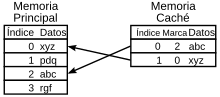
In computing, cache memory is fast access of a computer, which temporarily stores the newly processed data (information).
A cache is a special memory buffer that have computers, which works similarly to the way main memory, but is smaller and faster access. It is used by the microprocessor to reduce access time to data located in the main memory that are used more frequently.
Cache is a memory that is located between the central processing unit (CPU) and random access memory (RAM) to speed data exchange.
When you first access to data, the cache copy is made; the following accesses are made to that copy, making it less the average access time to data. When the microprocessor needs to read or write to a location in main memory, first checks whether a copy of the data is in the cache; If so, the microprocessor immediately reads or writes to the cache, which is much faster than reading or writing to main memory.
The cache unit is a special system of high-speed storage. It can be either a reserved area on the main memory as a device independent high-speed storage area.
There are two types of cache frequently used in personal computers: memory caching and disk caching.
A cache, sometimes called "RAM cache," is a part of static RAM (SRAM) high speed faster than dynamic RAM (DRAM) used as main memory. The cache is effective because the programs access again and again to the same data or instructions. By saving this information in SRAM, the computer avoids slow DRAM access.
When a data is in the cache, it is said that there has been a success, with a court cache hit rate (hit rate). Cache systems use a technology known as intelligent cache in which the system can recognize certain types of frequently used data. Strategies to determine what information should be put in the cache are one of the most interesting problems in computer science. Some caches are built into the architecture of microprocessors. For example, the Pentium II has 32 KiB cache first level (level 1 or L1) distributed in 16 KiB to 16 KiB for data and instructions; the second level cache (level 2 oL2) is 512 KiB and works half the frequency of the microprocessor. The L1 cache is at the heart of the microprocessor, and L2 is a printed circuit board next to it.
The disk cache works on the same principles as the cache, but instead of using high speed SRAM, uses conventional main memory. The most recent data on the hard disk that is accessed (and adjacent areas) are stored in a memory buffer. When the program needs to access data on the disk, the first thing to check is the disk cache to see if the data is already there. The disk cache can significantly improve application performance, since access a byte of data in RAM can be thousands of times faster than accessing a byte hard disk.
More: https://es.wikipedia.org/wiki/Cach%C3%A9_(inform%C3%A1tica)